Instabox (Instabee)
Instabee is the company behind Instabox and Budbee. In Invdash the carrier is called Instabox, and what you can book is delivery to an Instabox parcel locker the customer chooses. Budbee is a carrier of its own in the list, marked request only: Invdash can't book Budbee labels yet.
How agreements work in general is in Shipping agreements.
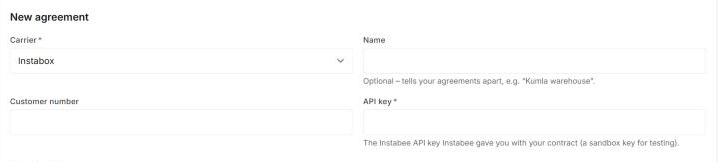
What you need from Instabee
- API key: the Instabee API key Instabee gave you with your contract. It is required.
Customer number is in the form but isn't needed for Instabox. If you have no API key, ask Instabee.
Add the agreement
- Open Settings › Freight › Shipping agreements and click Add agreement.
- Pick Instabox under Carrier.
- Fill in API key and the Sender address.
- Click Submit request.
Invdash reviews the agreement and tries the key with Instabee before it becomes Active.
Instabee has a test system (sandbox) with keys of its own. A key only works in the system it was issued for. If you send in a sandbox key, tell support, so that the agreement is set to Test (demo) at the review. Otherwise it is set to Live.
Product
In a shipment template there is one product for Instabox:
- Instabox skåp: delivery to the Instabox parcel locker the customer chose.
The product has no add-on services. Each booking is for one parcel, and the label is a PDF in A6 format.
Instabee requires the recipient's name, e-mail address, phone number, street address and city, even though the parcel goes to a locker.
Parcel lockers and the checkout
A parcel to Instabox is always booked to a particular locker:
- The customer chose a locker in the checkout. Add a delivery method of the type Parcel locker with Instabox as its carrier under Delivery methods in the checkout. The checkout shows the lockers Instabee offers for the customer's postal code. Once the purchase is done Invdash registers the parcel with Instabee, and when you book the label it is confirmed as packed.
- The order has no locker. When you book on the order yourself, you choose the locker under Pickup point in the booking form. When a pick list is finished, Invdash takes the nearest locker.
If Instabox doesn't deliver to the recipient's postal code there are no lockers to choose, and the delivery method isn't shown in the checkout.
Cancel a label
Instabox can't cancel a label from Invdash. The dialog where you confirm says: “Instabox can't cancel the label from here, so don't put it on a parcel.” The shipment is cancelled in Invdash, but the parcel is still registered with Instabee. Contact Instabee if it shouldn't be sent.
How to cancel is in Ship an order and Booked shipments.
Tracking
Instabee gives Invdash the parcel's status, not each scan. So the order shows one event per status, in Invdash's own words, such as “The parcel is booked with Instabox” or “The parcel is ready for pickup in the parcel locker”. The time on the event is when Invdash first saw the status.
The status is fetched about once a day, less often than with other carriers, and can stay at booked for a long time. Track the parcel opens Instabee's own tracking page, which shows where the parcel is right now. Read more in Tracking.
What doesn't exist for Instabox
- Return labels. A return template for Instabox says: “Invdash has no return services for this carrier yet.”
- Pickups. Invdash only books pickups with PostNord, see Pickups.
If something doesn't work
A booking that fails shows the answer in English, as it came. The most common ones:
- “Instabox needs the locker to deliver to”. No locker is chosen. Choose one under Pickup point and book again.
- “Instabox doesn't deliver to …” followed by a postal code. Instabox has no lockers for the recipient's postal code. Book with another carrier.
- “Instabee needs the receiver's …”. The order lacks something Instabee requires: name, e-mail address, phone number, street address or city. The message says which. Complete the order and book again.
- The carrier didn't accept the API key. Check the key and that the agreement is set to the right system. If the answer says “(sandbox)” it came from Instabee's test system.
- The label is booked but can't be printed. If Invdash couldn't fetch the label from Instabee, the parcel is booked all the same. Don't book it again. Contact support.
If none of that helps, see The label couldn't be booked.