Early Bird
With an Early Bird agreement in Invdash you book delivery to the mailbox or door, express delivery and delivery to Early Bird's parcel boxes. This article gathers what applies to Early Bird in particular. How agreements work in general is in Shipping agreements.
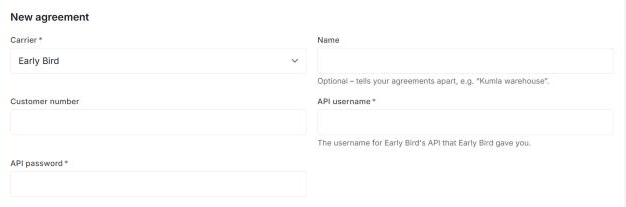
What you need from Early Bird
- API username: the username for Early Bird's API that Early Bird gave you. Required.
- API password: the password for the same account. Required.
- Customer number: optional. Fill it in if your API login may book for several of Early Bird's customers. The customer number is then sent with each booking, so that Early Bird knows which customer it is for. Ask Early Bird if you are unsure.
Add the agreement
- Open Settings › Freight › Shipping agreements and click Add agreement.
- Pick Early Bird under Carrier.
- Fill in API username, API password and the Sender address.
- Click Submit request.
Invdash reviews the agreement and tries the login with Early Bird before it becomes Active.
Early Bird has a test system beside the real one. A login only works in the system it is for. If you were given details for the test system, tell support, so that the agreement is set to Test (demo) at the review. Otherwise it is set to Live.
Products
In a shipment template you choose one of these products:
| Product | Delivered |
|---|---|
| Hemleverans | To the mailbox or door, before the day starts |
| Express | To the customer's home within 12 hours |
| Boxleverans | To one of Early Bird's parcel boxes |
The products have no add-on services in Invdash. The label is a PDF of 10 × 15 cm.
This is what Early Bird requires of the recipient:
- All products: an e-mail address or a phone number.
- Boxleverans: both an e-mail address and a Swedish mobile number (07…). The box's code is sent to the recipient by text message.
Phone numbers are rewritten to international format (+46…) when the booking is sent, so you don't need to change them on the order.
Parcel boxes and the checkout
Boxleverans is booked to the parcel box the customer chose in the checkout. Without a choice, Invdash takes the nearest box when a pick list is finished, and when you book on the order yourself you choose the box under Pickup point in the booking form.
With Delivery methods in the checkout, this applies to Early Bird:
- A delivery method of the type Parcel locker or Pickup point with Early Bird as its carrier shows the parcel boxes for the customer's postal code.
- Early Bird doesn't deliver to every postal code. For home delivery, Invdash asks Early Bird whether the customer's postal code is covered, and the delivery method is only shown where it is. If Early Bird can't answer in time, the delivery method is shown anyway.
Cancel a label
Early Bird can cancel a label from Invdash. The dialog where you confirm says that Early Bird is asked to cancel the label too. If Early Bird answers that it has no such parcel to cancel, Invdash says the label wasn't cancelled with Early Bird: then don't put it on a parcel, and contact Early Bird.
How to cancel is in Ship an order and Booked shipments.
Tracking
Invdash fetches the parcel's events from Early Bird and shows them on the order, with Early Bird's own descriptions. A parcel to a parcel box shows as Ready for pickup once it is in the box and as Delivered once the recipient has collected it.
Track the parcel opens Early Bird's tracking page, in Swedish for recipients in Sweden and otherwise in English. Read more in Tracking.
What doesn't exist for Early Bird
- Return labels. A return template for Early Bird says: “Invdash has no return services for this carrier yet.”
- Pickups. Invdash only books pickups with PostNord, see Pickups.
If something doesn't work
A booking that fails shows the answer in English, as it came. The most common ones:
- “Early Bird needs the receiver's e-mail or phone number”. The order has neither an e-mail address nor a phone number. Add one of them and book again.
- “Boxleverans needs the receiver's Swedish mobile number (07…)”. The recipient has no Swedish mobile number. Add one, or book with Hemleverans.
- “Boxleverans needs the receiver's e-mail”. Add the recipient's e-mail address.
- “Boxleverans needs the parcel box to deliver to”. No parcel box is chosen. Choose one under Pickup point and book again.
- The carrier didn't accept the API key. For Early Bird this means the username or password wasn't accepted. Check them and that the agreement is set to the right system. If the answer says “(test system)” it came from Early Bird's test system.
- The answer starts with “Early Bird API 400”. Early Bird didn't take the booking. After the colon it says which field it is about, such as the recipient's postal code.
- The label is booked but can't be printed. If Invdash couldn't fetch the label from Early Bird, the parcel is booked all the same. Don't book it again. Contact support.
If none of that helps, see The label couldn't be booked.