Pickups
Under Shipments › Pickups you ask the carrier to send a driver who collects your parcels. It is useful when you have no fixed collection, or have more parcels than usual.
Which carriers
Invdash books pickups with PostNord. You need an active PostNord agreement under Shipping agreements, and the sender address must be in Sweden, Denmark or Finland.
Book a pickup
- Open Shipments › Pickups.
- If you have several agreements, choose which one the pickup is booked with.
- Check the address under The driver collects at. It is the agreement's sender address. Tick It's a private address, not a business if that is the case.
- Fill in Contact for the driver. A phone number or an e-mail address is required.
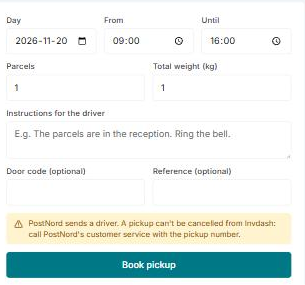
- Choose the Day, and the times From and Until between which the driver can come. The day can be today or later.
- Fill in Parcels (the number, 1–200) and Total weight (kg).
- Write Instructions for the driver, such as “The parcels are in the reception. Ring the bell.” They are required.
- Fill in Door code and Reference if needed. Both are optional.
- Click Book pickup and confirm. The confirmation shows the day, time, address, number of parcels and weight.
When the pickup is booked, the pickup number is shown, if the carrier gives one.
A booked pickup can't be cancelled from Invdash. Call the carrier's customer service with the pickup number if the driver shouldn't come.
Booked pickups
Under Booked pickups on the same page you see the pickups you have booked, the coming ones first.
Change the address
The driver collects at the agreement's sender address. You change it under Settings › Freight › Shipping agreements, by editing the agreement.
If something doesn't work
- No agreement to book a pickup with. Add a PostNord agreement under Settings › Freight › Shipping agreements. If you aren't an owner or admin, ask one of them.
- The carrier can't collect from the sender address's country. Pickups can only be booked for sender addresses in Sweden, Denmark and Finland.
- The until time must come after the from time. Correct the times and try again.
- The pickup couldn't be booked. The carrier's own message is shown. Correct what it points out and book again.