The label wasn't booked
You click Book and get no label. The fulfillment in the order says Booking failed, or the shipment is listed as Failed on the Shipments page. The reason is shown under the status, and that is what you go by.
Each label is booked with the carrier, who charges for it. If Invdash says the booking is in progress, never finished or couldn't be saved: read the section about bookings that didn't finish before you do anything else.
1. There is no active shipping agreement
The message is "No active shipping agreement to book with — add one under Settings › Freight.", or Nothing to book with yet on the Shipments page.
Open Settings › Freight › Shipping agreements and look at the agreement's card:
- Pending review: Invdash reviews and activates each agreement before it can book. Wait for the review.
- Rejected: read the Review note, click Edit and resubmit.
- Suspended or Revoked: contact support.
- "Labels can't be booked without your PostNord customer number.": click Add it and fill in the customer number.
- A carrier marked request only is one Invdash can't book labels with yet.
Only owners and admins can add and change agreements. See Shipping agreements.
2. Something is missing in the booking form
The form marks the field that needs correcting, and nothing is sent to the carrier:
- "Pick a delivery service": no service is chosen under Delivery service.
- "Pick a pickup point": the service delivers to a pickup point or parcel locker, and one has to be chosen under Pickup point.
- "No pickup points found": no pickup points came back for the delivery address and that service. Check the order's postal code and country, or choose another service.
- "Enter the weight in whole grams, from 1 to …": write the weight in grams, without decimals.
- "Pick which agreement to book the label with": there are several agreements to book with, and one has to be chosen under Agreement.
- "Couldn't load …'s delivery services.": click Retry.
3. The carrier refused the booking
Then it says Booking failed with the carrier's answer under it. For the most common faults Invdash first writes what to do, and then the carrier's own words in brackets:
| Message | Meaning | What to do |
|---|---|---|
| "The carrier didn't accept the API key. Check the key, and that the shipping agreement is set to the right system (Test or Live)." | The key is wrong, has been replaced at the carrier, or belongs to another system than the agreement is set to. | An owner or admin checks the key under Shipping agreements. Which environment the agreement is set to is decided at the review: tell support if the key is a test key. |
| "The carrier isn't taking more requests right now. Wait a moment and try again." | The carrier is limiting the number of bookings for the moment. | Wait a moment and book again. |
| "The carrier didn't answer. Try again in a little while." | The carrier's system is down or answering too slowly. | Wait and book again. If it goes on, ask the carrier. |
Any other answer is the carrier's own objection to this particular parcel, shown as it came. Most often it's about the receiver's address, the postal code, the weight or a service that doesn't go to that country. Do this:
- Correct what the carrier points at. You change the address on the order, see Edit an order. An order without a delivery address can't be booked.
- Click Rebook shipment on the fulfillment, choose the service, pickup point and weight again and click Book.
If you don't understand the carrier's answer, ask the carrier and give them the text word for word. What applies to a particular carrier is in PostNord, DSV, Instabee and Early Bird.
4. The booking didn't finish
These messages mean a label may exist with the carrier although Invdash doesn't have it:
- "The carrier booked the label, tracking number …, but Invdash couldn't save it. Don't book it again." The label exists with the carrier, and if you book again you pay for two. Write down the tracking number, and contact support if the label doesn't turn up on the fulfillment.
- "Booking in progress…" or "A booking is already under way. Wait a moment and reload." Someone else, or your previous click, is booking the same fulfillment right now. Wait and reload the page.
- "The last booking never finished. Ask the carrier whether the label was booked before booking another." The booking was cut off before the carrier had answered. The fulfillment shows the booking's reference and when it started. Ask the carrier whether it has a label for that reference. Choose Mark as not booked only once the carrier has said it has none. After that you can book again.
- "The shipment is already booked." Reload the page: the label is already on the fulfillment.
5. The order can't be shipped
- "This order is cancelled, so nothing more is fulfilled for it." A cancelled, refunded or failed order can't be shipped.
- A cancelled fulfillment can't be booked. Start a new fulfillment for the items.
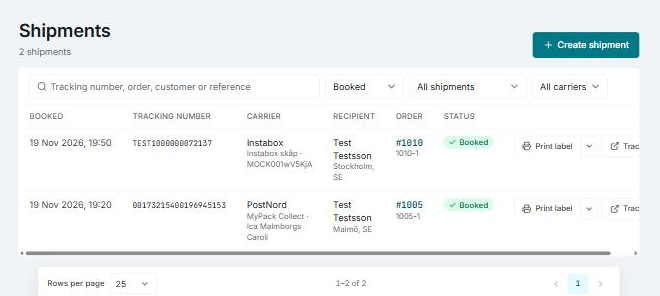
The whole flow is described in Ship an order, and the list of booked and failed labels in Booked shipments.
If it still doesn't work
Write to support and include:
- the company's name and which store it's about
- the order number and the fulfillment's code
- the carrier and the delivery service you chose
- the message under Booking failed, word for word, with the carrier's text in brackets
- the booking's reference and the tracking number, if either is shown
- roughly when you tried to book.
See Contact support. Never send the carrier's API key.