Tracking
Once a label is booked, Invdash follows the parcel with its carrier. You see where the parcel is right on the order, the shop is told the tracking number, and the customer can get messages as the parcel gets closer.
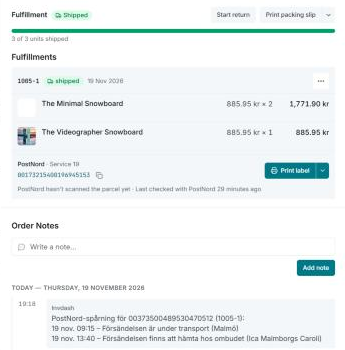
Where you see the tracking
Open the order and go to Fulfillment. Under the parcel's tracking number you see:
- A status that says where the parcel is right now (see below).
- The parcel's latest event, that is, the carrier's latest scan with time and place. A link under it shows every event.
- When the parcel was last checked with the carrier, so you know how fresh the information is.
If the carrier hasn't scanned the parcel yet, it says so. The parcel's menu has Track the parcel, which opens the carrier's own tracking page. The list under Shipments has the same link as Track on each row.
Invdash asks the carrier at regular intervals, so a new scan can take a little while to show.
The statuses
- Not handed in yet: the carrier only knows of the label. The parcel hasn't been scanned.
- On its way: the parcel is with the carrier and on its way to the recipient.
- Out for delivery: the parcel is with the driver.
- Ready for pickup: the parcel is waiting at a pickup point or in a parcel locker.
- Delivered: the parcel has been handed over.
- Delivery issue: something has happened to the delivery, such as a delay or that the parcel couldn't be handed over. Read the latest event.
- Returned to sender: the parcel is on its way back to you.
What the shop is told
When the label is booked, the shop gets the tracking number:
- WooCommerce: as an order note with the carrier, tracking number and tracking link.
- Shopify: on the order's fulfillment in Shopify, once the fulfillment has shipped.
- Abicart: on the order's shipment in Abicart, once the fulfillment has shipped.
The parcel's new scans are also written as a note on the shop's order, so whoever works in the shop's admin sees where the parcel is too. The customer isn't sent that note.
- WooCommerce: as a private order note.
- Shopify: as a note kept on the order. It shows among the order's notes in Invdash and on the order's page in Shopify's admin, but not in Shopify's timeline.
- Abicart: doesn't take notes from Invdash. The scans only show on the order in Invdash.
Only scans that are at most 48 hours old when Invdash first sees them become notes. If a parcel is first followed several days after it was sent, the older events show on the order in Invdash, but not as notes in the shop. That the carrier has only been given the label's details doesn't become a note either.
What the customer is told
- The WooCommerce note with the tracking number goes to the customer, and Shopify sends its own shipping confirmation with the tracking.
- If you have a customer message in Invdash that already shows the customer the tracking, the shop's notice isn't sent as well, so the customer isn't told the same thing twice.
- With customer messages, the customer can be told when the parcel is out for delivery, ready for pickup or delivered, and reminded if the parcel is still at the pickup point after five days.
You set up the messages under Customer messages.
Returns
Return labels are followed the same way. The return's first scan shows that the parcel is on its way back, and its delivery that it has arrived at the shop. Read more in Handle returns.