Orders are missing in Invdash
An order has been placed in the shop but doesn't show in Invdash, or an order was changed in the shop (status, address, lines) and Invdash doesn't show the change. Work through the points below in order: the most common causes come first.
1. Look at the right store, without filters
Often the order is in Invdash, but the list isn't showing it.
- The right store. The Orders page only shows the active store's orders. The store's name is in the top bar: click it to switch. A member only sees the stores they've been given access to, see Several stores.
- The right tab. To begin with you see the tabs All, Processing and On Hold. Search for the order number: if the order is under another status the list says so, with the button Show in All.
- No filters. Click Clear all and Clear dates if the list is filtered. Read more in The order list.
2. Sync by hand
This is how fast a new order usually arrives:
- WooCommerce: within a few seconds when webhooks are set up, otherwise with the next scheduled sync.
- Shopify: at once. Shopify tells Invdash itself when something changes.
- Abicart: at once when Instant orders is on. When it's off, new orders show up with the regular sync, within about 15 minutes. The state is shown on the store's row under Settings › Integration › Stores, see Connect an Abicart shop.
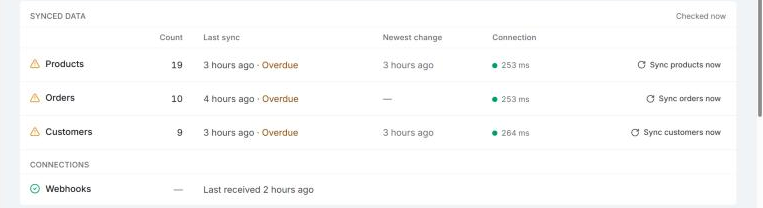
If you don't want to wait, click the sync button in the top bar (Sync from WooCommerce, or the platform the store is on), or Sync orders now on the Sync health page. Both are there for owners and admins.
If you get the message "A sync is already running for this store. Try again in a minute.", a fetch is already under way. Wait a minute and look at the list again.
3. Read the verdict on Sync health
Open Settings › Integration › Sync health. The verdict at the top says whether the sync is working:
| Verdict | Meaning | What to do |
|---|---|---|
| Sync is paused | "Nothing syncs while the store is paused. Resume it from the Stores page." | Click Resume sync on the store's row under Stores. |
| Can't reach the store | The shop didn't answer, or didn't accept the keys. The box says which. | See the next section. |
| Order sync failing | The latest run failed. The reason is listed under Failures. | Click Sync orders now. If it keeps failing, run Test connection on the Stores page. |
| Order sync last ran … | No sync has succeeded for over an hour. | Click Sync orders now. |
| … orders missing (last 48 h) | "WooCommerce has orders that Invdash doesn't. Use Sync orders now to fetch them." This check is only made for WooCommerce. | Click Sync orders now. |
| Importing …, Waiting for first sync or Never synced | The store is new and the first import isn't finished. Products are read in first, then orders, then customers. | Wait. If it says Never synced, run Test connection. |
Everything on the page is explained in Sync health.
4. If the shop can't be reached
Run Test connection on the store's row under Settings › Integration › Stores. What's wrong differs between the platforms:
- WooCommerce. "WooCommerce rejected the API keys." means the key has been removed or replaced in WooCommerce: create a new one with the Read/Write permission and save it with Edit. Other results are about the store's address, its SSL certificate or the site not answering in time. See Connect a WooCommerce shop.
- Shopify. "The app can't act on this shop any more. Install it on the shop again from the Dev Dashboard." means the app has been uninstalled from the shop. "Shopify refused the client ID or secret." means the details have been changed: copy them again and save them with Edit. See Connect a Shopify shop.
- Abicart. "Abicart refused the API key. Create a new one in Abicart and save it here with Edit." or "The key may not read orders. Ask Abicart's support to switch on API access (“Integration med eget system”)." See Connect an Abicart shop.
5. WooCommerce: changes arrive late
Do the orders arrive, but only after a while? Then the scheduled sync works but the shop's webhooks don't.
- Open Settings › Integration › Webhooks. If the store's row says Needs setup or Action required, the row says what is left to do, see Webhooks.
- If it says "Disabled in WooCommerce · re-enabling failed", WooCommerce has switched the webhooks off and Invdash couldn't turn them back on. Check that the API key has the Read/Write permission.
- If the Plugin row on Sync health says Too old to sync or Not reachable, see The Invdash plugin for WordPress.
A notification with the text "Order #… changed in WooCommerce, but Invdash couldn't save the change. A sync brings it up to date." means a single change couldn't be saved. The next sync fetches it, or you sync by hand.
6. Older orders in Shopify
Shopify only shows the last 60 days of orders to an app like Invdash. Older order history is therefore not read in, see What Invdash does with a Shopify shop.
Orders keep coming in even when you are over the plan's order limit. See Plans and billing.
If it still doesn't work
Write to support and include:
- the company's name and which store it's about
- the order number in the shop and roughly when the order was placed or changed
- the verdict at the top of Sync health and the text under Failures, word for word
- what Test connection showed.
See Contact support. Never send API keys or secrets.